
Automotive 3D modeling works best as a controlled asset family, not one universal car file. A marketing close-up may need surface continuity and a layered paint shader that would be excessive for a browser. A configurator needs dependable part boundaries and valid option logic. An augmented reality asset needs physical scale, a stable origin and materials that survive its target renderer. All three can descend from the same approved vehicle definition without sharing identical geometry or shading.
That distinction sets the workflow: register the source evidence, define the sellable vehicle hierarchy, build a visualization master, and derive each channel against its own acceptance record. The broader guide to 3D product modeling inputs, accuracy levels and deliverables explains the cluster-wide choices. This article stays with the automotive problem: body, interior, wheel and material variation across marketing, configurators and AR.
Start with source precision, not surface polish
Begin with a source register rather than a file extension. For every input, record its vehicle or program ID, configuration, market or effective date when relevant, revision, units, coordinate system, owner and permitted use. Label whether the file controls visible shape, assembly structure, finish, artwork, option eligibility or only visual reference. A physical sample, photograph or scan can resolve appearance without silently becoming dimensional authority.
STEP can contain more than shape. NIST describes STEP files as representations of parts, assemblies and Product and Manufacturing Information used across CAD, manufacturing, analysis and inspection systems.[1] The file still needs inspection. Its extension alone does not show which assemblies, PMI, validation properties or revisions are present.
Representation type matters too. NIST describes triangular facet data as an approximation of surfaces and precise boundary-representation geometry as an explicitly defined topological model; it also documents hybrid models that can combine representation types.[2] A dense mesh may be suitable for a specified visual envelope, but density does not turn it into released engineering definition.
Set precision by visible decision. Name the views and features that need checking: exterior silhouette, shut lines, lamp boundaries, glazing, wheel openings, cabin touchpoints, stitched seams or small graphics. Ask the product authority to supply the controlling dimensions and tolerances for those checks. Do not invent a studio-wide millimetre threshold or imply that a render mesh proves fit, crash performance, manufacturability or legal compliance.
Model the vehicle as a governed hierarchy
A car configuration is not a pile of optional meshes. It is a set of dependent choices attached to one identity. The following automotive asset hierarchy is an original Double Edged framework, not an OEM standard. Adapt the names to the product records that actually control the vehicle.
| Layer | What it identifies | Typical controlled content | Change question | Derivative impact |
|---|---|---|---|---|
| Vehicle baseline | The approved vehicle definition at a named revision | Overall proportions, hard points visible in scope, reference axes and shared structure | Did the controlling form or reference system change? | Recheck every active configuration and channel |
| Sales context | The market, model period or other effective sales context | Available trims, naming, permitted equipment and current artwork | Is this choice valid for the intended audience and date? | Rebuild the valid-state list before rendering |
| Trim and package | A named combination or dependency rule | Exterior equipment, cabin equipment, finish families and included options | Is the package additive, substitutive, dependent or exclusive? | Update configuration logic and affected visuals |
| Body and exterior | The visible body state | Panels, fascias, lamps, glazing, roof treatment, mirrors, sensors and badges if supplied | Which geometry or artwork changes, and in which views? | Exterior renders, turntables, configurator and AR |
| Interior | The visible cabin state | Dashboard, console, seats, door cards, controls, upholstery, trim and display state | Which cabin viewpoints expose the change? | Interior stills, camera transitions and configured states |
| Wheel assembly | A complete compatible wheel state | Rim, finish, tire envelope and supplied visible brake components | Is this a material change or a geometry package? | Stance review, motion, configured state and AR |
| Appearance | The approved material and graphic assignments | Paint, glass, metal, polymer, fabric, illumination and decals | Which zones and renderer implementations inherit the revision? | Look development and every translated material set |
| Presentation | A channel-specific scene and export | Cameras, lighting, animation, interaction, environment and packaging | Where will this exact derivative run or be delivered? | Acceptance remains local to that destination |
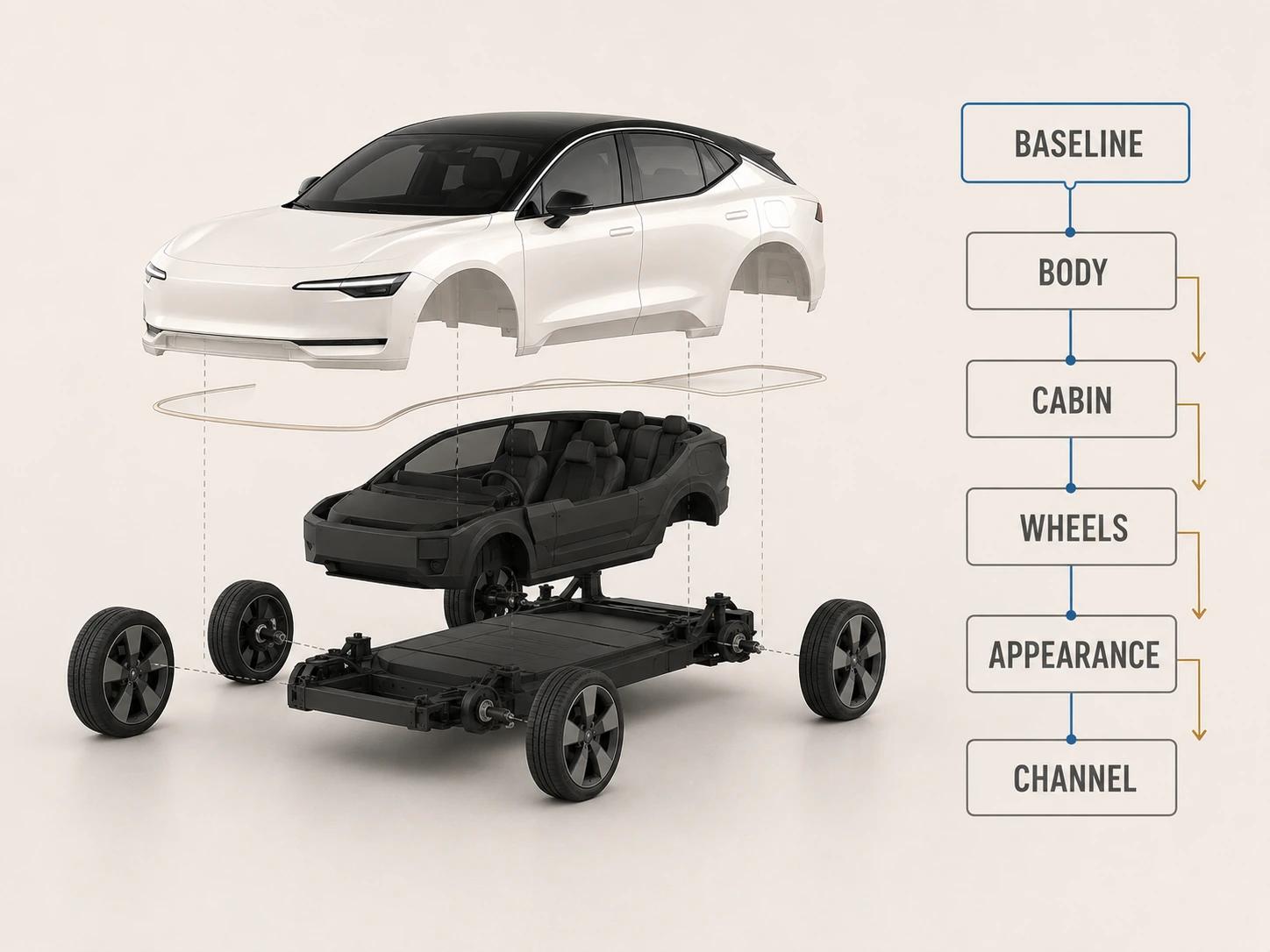
Keep stable IDs at every layer. Customer-facing names may change while internal geometry and finish records remain the same; the reverse can happen too. A useful state points to IDs such as baseline, sales context, trim, body package, cabin package, wheel package and paint, then resolves those IDs to scene nodes and materials. A folder named Sport_final cannot carry that logic.
The hierarchy should also preserve absences. If a roof option removes rails, or one wheel package excludes another component, the resolved state must explicitly hide or replace the affected parts. Otherwise, the asset can assemble a plausible vehicle that was never approved as a valid offering.
Keep option logic outside the scene graph
Treat the product option table as the authority and the 3D scene as one consumer. For each choice, store its stable ID, label, effective context, dependencies, exclusions, default status and the geometry, material, graphic or animation changes it triggers. Resolve a full valid state before asking the renderer to show it.
This boundary is important when a runtime format has its own variant mechanism. The ratified glTF KHR_materials_variants extension represents finite, premade, asset-level combinations of materials on shared geometry. Its design explicitly does not cover hierarchical sub-variants.[4] That can package paint or upholstery choices for a compatible viewer. It is not a sales rules engine, and it does not by itself handle a wheel geometry swap, a changed fascia or a dependency between trim and cabin equipment.
Export only the resolved combinations a destination can use. Keep the commercial logic, scene-node mapping and export mapping traceable to one another, but do not force all three into the same schema.
Build body, interior and wheel variants as complete states
For the body, identify shared geometry and substitution zones before optimization. Separate panels only where a variant, animation, material boundary or review need justifies it. Record which state owns each fascia, lamp, roof element, mirror, glazing treatment, lower trim piece and supplied graphic. Check the seams around substituted parts under the cameras that will actually be released.
The cabin needs its own visibility plan. List exterior-through-glass views, open-door views, driver and passenger viewpoints, rear-seat views and detail shots in scope. A model built only for an exterior three-quarter image may lack the back surfaces, controls, stitching or material zones an interior camera reveals. Organize dashboard, console, seats, door cards, headliner and controls so the approved cabin package can be resolved without carrying every hidden option into every export.
Treat a wheel package as an assembly rather than a paint swatch. Map the rim geometry and finish, tire representation, supplied sidewall graphics and any visible brake components that belong to the approved state. Preserve the approved wheel center, orientation and contact relationship when making a lighter derivative. Khronos' real-time asset guidance notes that repeated elements such as car wheels can reference shared geometry, while warning that baked effects such as ambient occlusion may conflict across instances.[3] Instancing is an implementation choice, not proof that all four assemblies are visually interchangeable.
Treat automotive materials as appearance records
A color name is not enough to recreate paint, glass or trim. Give each material a stable ID and record its intended substrate or layer, reference source, material zones, texture provenance, renderer implementation, review lighting and version. Keep the product finish identity separate from the shader that approximates it in a particular renderer.
The glTF material system provides a useful example of that separation. Khronos' real-time guidance describes a metallic-roughness workflow built around base color, metallic and roughness inputs.[3] Its clearcoat extension adds a coating layer over a base material, with separate intensity, roughness and normal controls.[5] Those parameters can represent part of a coated-surface response. They do not prove that a pearl paint, polished black trim or coated interior piece matches its approved reference in every light or renderer.
Reflection-sensitive surfaces need a review lane of their own. Use a neutral light sweep to inspect highlight flow across the body, grazing views for surface breaks, a dark-and-bright environment for glass and gloss-black trim, and a broad studio setup for paint character. Turn the vehicle rather than approving one flattering still. A seam, normal discontinuity or roughness error can disappear from one camera and announce itself in the next.

Do not bake the marketing environment into the product material unless that is a deliberate destination treatment. AR makes the risk clear: Google's Environmental HDR guidance uses a main light, ambient spherical harmonics and an HDR cubemap, and notes that the cubemap affects reflections and the appearance of glossy objects.[8] The room around the vehicle can therefore change what a reflective surface shows. Accept material identity in stated review conditions, then test behavior in representative target environments without promising identical pixels.
Derive marketing, configurator and AR assets separately
The visualization master should retain the approved hierarchy, high-quality surface representation, material records and derivation history. It is a source for channel work, not a file that must ship unchanged. This channel-derivative table is an original Double Edged framework.
| Derivative | Preserve from the master | Rebuild or simplify deliberately | Acceptance evidence | Unsafe shortcut |
|---|---|---|---|---|
| Marketing stills | Vehicle state IDs, camera-relevant shape, material identity and visible detail | Renderer shaders, scene lighting, off-camera detail and image-specific rigging | Comparison views, material review, final crop and approved vehicle-state record | Approving product truth from one beauty angle |
| Marketing motion | The approved states plus pivots and moving-part relationships in scope | Animation rig, motion-specific geometry, blur and shot lighting | Frame-range review, intersection check and state continuity | Letting a cinematic adjustment alter the controlled vehicle state |
| Configurator | Valid resolved options, stable node and material mappings, shared coordinate system | Runtime topology, texture set, state switching and interaction behavior | Exhaustive valid-state test, transition review and destination profiling | Treating scene visibility as the commercial rules database |
| AR | Vehicle identity, physical dimensions supplied for the task, material zones and grounded orientation | Runtime geometry, textures, supported materials, origin and destination packaging | File validation plus review in the named renderer, browsers and devices | Calling a local preview universally AR-ready |
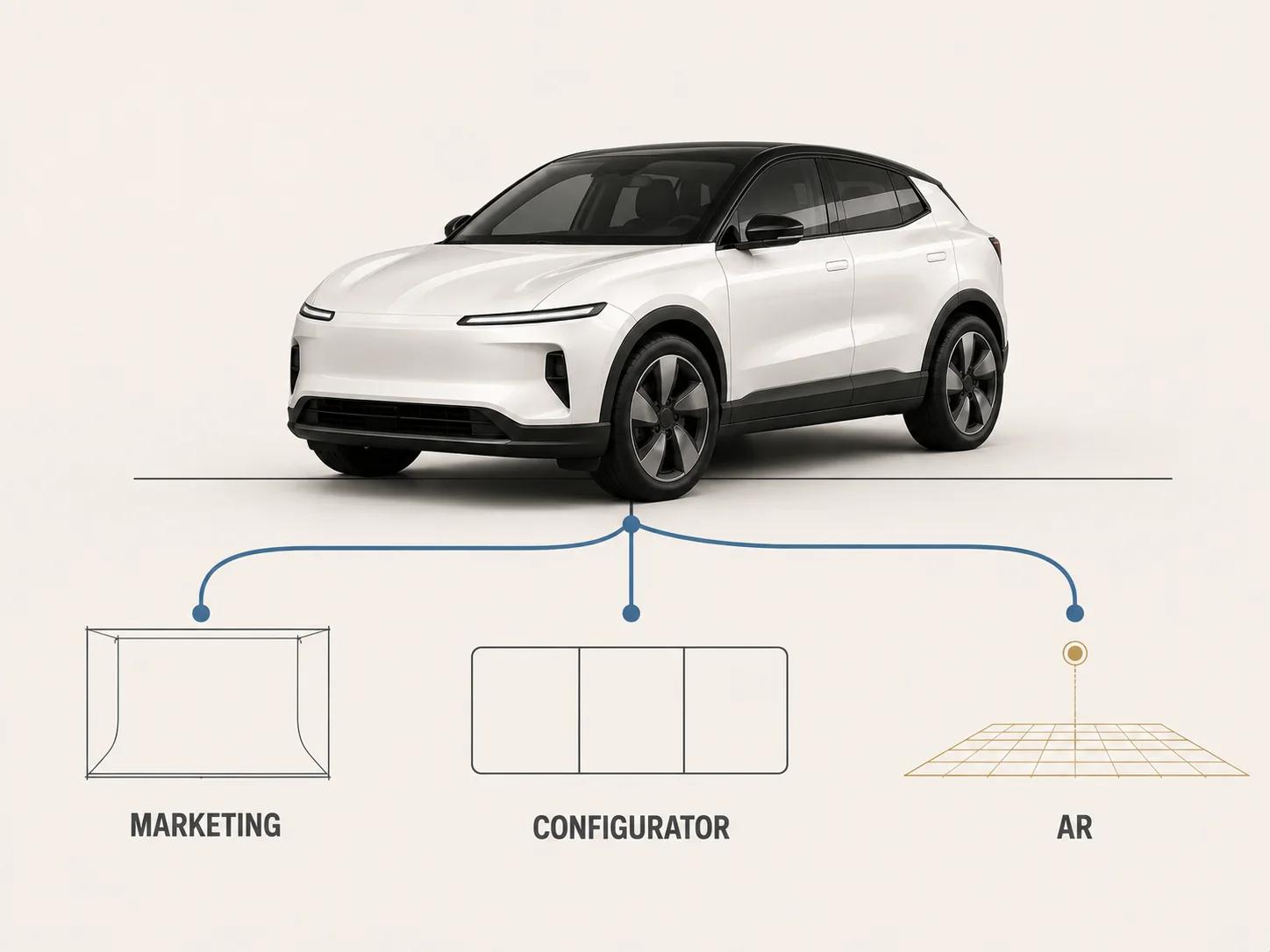
For real-time work, set units and origin explicitly. Khronos' commerce guidance specifies 1:1 scale for the represented item, one metre per glTF unit and a deliberate product origin, with the general example of bottom center for grounded products.[3] The project still has to define which physical configuration and dimensions control the vehicle.
A web-to-AR route also has destination conditions. Google's <model-viewer> guidance supports glTF and GLB for web display, while its AR features require compatible devices and browsers.[7] Apple advises that its USD renderers support different subsets of USD features and tells authors to validate content in the target renderer, because structural validation does not catch every visual or behavioral problem.[6] Plan GLB, USDZ or another package only after naming the runtime. A successful export is not cross-platform acceptance.
Govern changes and accept exact revisions
Assign immutable IDs to the source baseline, visualization master, option table, material library and every released derivative. When a source changes, run an impact review by attribute: which body states, cabin packages, wheels, materials, cameras and channels expose it? Update only affected derivatives, but record explicit non-impact decisions for the rest.
Use separate acceptance gates:
- Product representation confirms that the exact vehicle state matches the controlling visible evidence within owner-supplied criteria.
- Configuration confirms that every released state is allowed, complete and mapped to the correct geometry, materials and graphics.
- Appearance confirms each finish in named lighting and views, including reflection motion across paint, glass and polished trim.
- Scene quality checks hierarchy, transforms, normals, UVs, dependencies, pivots and the approved camera envelope.
- Destination acceptance checks the exact export in its marketing pipeline, configurator build or AR renderer under recorded conditions.
- Release control ties all decisions, open limitations and files to immutable revisions.
Do not collapse these into one status called "approved." A product reviewer cannot certify runtime behavior by signing a still, and a file validator cannot certify trim truth. Set project-specific criteria after the vehicle scope, destination and risk views are known. Universal polygon counts, texture limits, visual-fidelity percentages and dimensional tolerances would be guesses here.
Brief the first representative vehicle before the whole range
Start with one normal configuration and one risk state that exposes a meaningful change, such as a different fascia, cabin package, wheel geometry or reflection-sensitive finish. The aim is to test the hierarchy and derivative method before multiplying assets, not to predict a sales result.
A useful automotive 3D modeling brief includes:
- the baseline identity, source register, units, axes, revisions and unresolved conflicts;
- the sales contexts, trim dependencies, exclusions and exact states in scope;
- body, interior, wheel, material, graphic and animation ownership;
- the required cameras, opening or moving parts and visible-detail envelope;
- separate marketing, configurator and AR deliverables with named destinations;
- material references and review lighting for paint, glass, metals, polymers, textiles and illumination;
- owner-supplied dimensional checks and product, appearance, technical and destination reviewers;
- the derivation log, file manifest, change triggers, acceptance evidence and known limitations.
For the differences among engineering CAD, visualization scenes and runtime files, use 3D Models for Product Design: CAD, DCC and Real-Time Differences. That distinction keeps this automotive hierarchy honest: each derivative may be fit for its channel without pretending to replace the controlled product definition.
Bring a vehicle hierarchy into production
The 3D product modeling service is the relevant commercial destination when approved vehicle sources need to become a governed visualization master and tested channel derivatives. Bring one representative configuration, the source and option registers, intended views, finish references and destination list. That is enough to scope the work without inventing a universal automotive workflow.